
objectarx尺寸标注设置
转载:http://blog.sina.com.cn/s/blog_4c4a15950100rm0x.html
AcDbDatabase *pcurdb=acdbHostApplicationServi
设置自动标注的精度pnewdimrecord->setDimdec(2);
设置标出的值是图形实际尺寸的一半,而不是尺寸的实际值
AcDbRotatedDimension *pdim;pdim->setDimlfac(0.5)
在我们建立标注样式或文字样式时都习惯把他们设一个名字,如setName(_T(“仿宋”))
但是取了名字之后有一个问题就是,下次再调用这个程序是,如果程序识别到已经有这个名字的存在,它就不会再对样式表进行设置了,所以我们很多时候调用了一次,下次调用发现根本就没起作用就是这个道理。(当然这也是我自己的判断)。
调用线型设置对话框
//隐形函数,需要自己定义
bool acedLinetypeDialog( AcDbObjectId old_linetypeId, // ObjectId for current linetype: acdbCurDwg()->celtype();
bool IncludeByBlockByLayer, // Posibility of selecting “bylayer” or “byblock” TCHAR *&new_linetypeName, // Name of selected linetype
AcDbObjectId &new_linetypeId // ObjectId for selected linetype
);
//调用
AcDbObjectId new_linetypeId;
TCHAR * new_linetypename = NULL;
if(!acedLinetypeDialog(acdbCurDwg()->celtype(),false,new_linetypename,new_linetypeId))
{
return;
}
Dimension各参数含义
Each dimension has the capability of overriding the settings assigned to it by a dimension style. The following properties are available for most dimension objects:
- Dimatfit
-
Specifies the display of dimension lines inside extension lines only, and forces dimension text and arrowheads inside or outside extension lines.
- Dimaltrnd
-
Specifies the rounding of alternate units.设置主单位–舍入值
- Dimasz
-
Specifies the size of dimension line arrowheads, leader line arrowheads, and hook lines.
设置标注箭头大小,引线箭头大小,和hook lines
- Dimaunit
-
Specifies the unit format for angular dimensions.设置角度标注的单位格式
- Dimcen
-
Specifies the type and size of center mark for radial and diametric dimensions.
- Dimclre
-
设置尺寸界线的颜色.
- Dimdsep
-
设置线型标注的小数分隔符.
- Dimfrac
-
Specifies the format of fractional values in 标注和公差.
- Dimlfac
-
Specifies a global scale factor for linear dimension measurements.
设置线型标注的全局比例
- Dimltex1, Dimltex2
-
设置尺寸界线的线型.
- Dimlwd
-
Specifies the lineweight for the dimension line.
- Dimlwe
-
设置尺寸界线的线宽
- Dimjust
-
Specifies the horizontal justification for dimension text.
- Dimrnd
-
Specifies the distance rounding for dimension measurements.
- Dimsd1, Dimsd2
-
Specifies the suppression of the dimension lines.
- Dimse1, Dimse2
-
Specifies the suppression of extension lines.
- Dimtfac
-
Specifies a scale factor for the text height of tolerance values relative to the dimension text height.
- Dimlunit
-
Specifies the unit format for all dimensions except angular.
- Dimtm
-
Specifies the minimum tolerance limit for dimension text.
- Dimtol
-
Specifies if tolerances are displayed with the dimension text.
- Dimtolj
-
Specifies the vertical justification of tolerance values relative to the nominal dimension text.
- Dimtp
-
Specifies the maximum tolerance limit for dimension text.
- Dimzin
-
Specifies the suppression of leading and trailing zeros, and zero foot and inch measurements in dimension values.
- Prefix
-
Specifies the dimension value prefix.
- Suffix
-
Specifies the dimension value suffix.
- TextPrecision
-
设置角度标注文字的精度.
- TextPosition
-
设置文字位置.
- TextRotation
-
Specifies the rotation angle of the dimension text.
按对话框内容组织:
Dimdle — 尺寸线 — 超出标记 | 100
Dimclrd — 尺寸线 — 颜色 | ByBlock
Dimexe — 尺寸界线 — 超出尺寸线 | 100
Dimexo — 尺寸界线 — 起点偏移量 | 250
Dimdli — 基线间距 — 0
Dimblk — 符号和箭头 | 建筑标记
Dimblk1 Dimblk2 — 符号和箭头 — 箭头1/箭头2 | 建筑标记
Dimazs — 符号和箭头 — 箭头大小 | 100
Dimtxsty — 文字 — 文字样式 | TSSD_Dimension
Dimclrt — 文字 — 文字颜色 | 7
Dimtxt — 文字 — 文字高度 | 350
Dimgap — 文字 — 从尺寸线偏移 | 100
Dimtad — 文字 — 文字位置垂直 | 1 — 上方
Dimjust — 文字 — 文字位置水平
Dimtih与Dimtoh共同确定文字对齐样式
Dimtih — 文字 — 文字对齐 在尺寸界线内的时候–关
Dimtoh — 文字 — 文字对齐 在尺寸界线上的时候–关
关 将文字与尺寸线对齐 开 水平绘制文字
Dimatfit/Dimtix/Dimsoxd共同确定调整选项
DIMATFIT — 调整–
0 将文字和箭头均放置于尺寸界线之外 1 先移动箭头,然后移动文字 2 先移动文字,然后移动箭头 3 移动文字和箭头中较合适的一个 –对结构设计,应选择2
Dimtix — 调整 — 文字始终保持在尺寸界线之间 | 开
Dimsoxd — 调整 — 空间不足时,是否显示箭头 | 开
Dimtoh — 调整 — 尺寸线上方,不带引线
Dimtmove — 调整 — 文字位置 | 2–尺寸线上方,不带引线
Dimtofl — 调整 — 优化-在尺寸界线之间绘制尺寸线 | 开
Dimtdec — 公差 — 公差精度 | 0
Dimdec — 精度 — 0
买二手房注意事项
买二手房的话特别需要注意以下几点
一:首先要拉房子的产调,拿着身份证,弄清楚自己买房子的准确地址,多少弄,多少号,几零几,产调要不了多少钱,就二十块钱左右,产调上可以看到房子的所有信息。重要的内容主要有,房子是否抵押,房子是否有产权纠纷,有多少个产权人,还有最重要的房子的竣工时间。
二:看到房子的竣工时间,可以推算房子的房龄,房龄大于20年的话只有工商银行可以做抵押贷款,其它银行都不做,而且基本没有办法贷款到七成,资质好的可能能贷款到六成五,差的可能只能贷款到六成,剩下的必须要自己掏现金,这对于买房子来说也是一笔很不小的数字,需要慎重考虑,计算清楚,即使再困难,也不能满打满算必须留一定的余地
否则一旦有点小问题,则可能造成重大经济损失。
acedSSGet关键字:K示例代码
resbuf* ssCallback(const TCHAR* kword)
{
CAcModuleResourceOverride res;
GTextBrushDialog dlg(CWnd::FromHandle(adsw_acadMainWnd())); dlg.DoModal();
return NULL;
}
//代码如下
resbuf* (*oldFunc) (const ACHAR*);
acedSSGetKwordCallbackPtr(&oldFunc);
acedSSSetKwordCallbackPtr(ssCallback);
resbuf* rb = acutBuildList(RTDXF0, _T(“TEXT,MTEXT”), 0);
ads_name ssName;
TCHAR* promptPtrs[2]={_T(“\n选择样本文字[设置(S)]:”),_T(“\n移除样本文字:”)};
acedInitGet(RSG_NONULL,_T(“S”)); //特别注意必须初始化输入内容,最初我就是因为少这个而导致执行错误
ACHAR kwordlist[] = { _T(“S _ S”) };
int rc=acedSSGet(_T(“:$:S:K”), promptPtrs,kwordlist,rb,ssName);
if(rc!=RTNORM)
{
acutRelRb(rb);
acedSSSetKwordCallbackPtr(*oldFunc);
return;
}
acutRelRb(rb);
acedSSSetKwordCallbackPtr(*oldFunc);
关闭自动更新
自动更新可以提示您最新的CAD好帮手版本
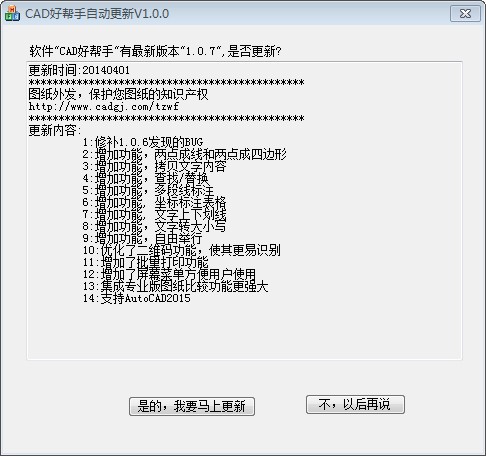
但是自动更新的原理就是每天打开电脑后第一次开CAD通过后台进程去下载服务器信息
进行版本比价,发现最细版本就提示用户下载
如果您的电脑无法联网,则每天的自动更新就是白白浪费资源,可以参照下面的提示关闭自动更新
打开安装目录下的AutoUpdate目录
找到UpdateLog.ini
;;文件名:UpdateLog.ini
;;作 用:自动更新日志
;;内 容
[UpdateLog]
;;上一次尝试更新的时间
LastTry=2014-05-14 20:08:22
;;上一次成功更新的时间
LastSuccess=2014-05-14 20:08:24
将LastTry=2014-05-14 20:08:22
改为LastTry=2094-05-14 20:08:22或者更后面的时间则CAD好帮手的自动更新将被永久关闭。
ARX创建并绑定外部参照
AcDbObjectId xrefBTRid=AcDbObjectId::kNull;
//创建外部参照
acedXrefAttach(_T(“C:\\教育版.dwg”),_T(“教育版”),&xrefBTRid);
//绑定外部参照
acedXrefBind(_T(“教育版”));
缺点:只能对当前文档创建外部参照,而且类似于用户手动操作,如果绑定的文件是教育版的,缺字体,有自定义实体等都会弹出提示
未公开的XREF API 文档…
XREF API DOCUMENTATION
See Also: SignPost Contents SignPost Index Xrefs
Product AUTOCAD Author SZILVASY,ALBERT Date 27-AUG-99 Document ID 42357 Expiration date Attachments Keywords _XREF
Developer Consulting Group technical solution. Autodesk confidential, for ADN members only. Please read the disclaimer
Question
How can I create xrefs using ObjectARX?
Answer
The following function have been introduced with ObjectARX 2000:
acedXrefAttach() acedXrefOverlay() acedXrefUnload() acedXrefDetach() acedXrefReload() acedXrefBind() acedXrefXBind() acedXrefCreateBlockname()
The ObjectARX Reference Manual does not document these function that has been logged as documentation defect. Here’s more information on them:
Common rules: 1. All Xref APIs operate on the current document only. 2. The APIs provide document locking internally, if the document cannot be locked they return Acad::ErrorStatus eLockViolation. 3. No input validation or range checking is done other than checking for NULL pointers or strings. Input validation is the caller’s responsibility. 4. Xref log file processing is available if option is enabled. 5. Normal AutoCAD behavior with regards to output indicators, such as, progress meters, and msgs, may be turned off when scripts enabled && cmdecho == 0, or menu macros enabled && menuecho == 0, or menu encryption set.
—– Acad::ErrorStatus acedXrefAttach(const char* XrefPathname, const char* XrefBlockname, AcDbObjectId* pXrefBTRid = NULL, AcDbObjectId* pXrefRefid = NULL, const AcGePoint3d* pXrefInsertPt = NULL, const AcGeScale3d* pXrefScale = NULL, const double* pXrefRotateAngle = NULL, const Adesk::Boolean bQuiet = Adesk::kTrue);
Attaches an xref file to the current document.
Returns: Returns Acad::eOk if operation is successful.
Parameters: const char* XrefPathname [in] Xref file pathname const char* XrefBlockname [in] Xref block name symbol to use AcDbObjectId* pXrefBTRid [out,optional] AcDbObjectId ptr for the attached/overlaid Xref block object Id AcDbObjectId* pXrefRefid [out,optional] AcDbObjectId ptr for the attached/overlaid Xref block reference object Id const AcGePoint3d* pXrefInsertPt [in,optional] AcGePoint3d ptr for Insertion Pt const AcGeScale3d* pXrefScale [in,optional] AcGeVector3d ptr for Scale factor const double* pXrefRotateAngle [in, optional] double ptr for Rotate angle(radians) const Adesk::Boolean bQuiet [in, optional] Flag to suppress output msgs
Default behavior is as follows: Insertion Point(X,Y,Z) = 0.0, 0.0, 0.0 Scale Factor(X,Y,Z) = 1.0, 1.0, 1.0 Rotation Angle(radians) = 0.0
——- Acad::ErrorStatus acedXrefOverlay(const char* XrefPathname, const char* XrefBlockname, AcDbObjectId* pXrefBTRid = NULL, AcDbObjectId* pXrefRefid = NULL, const AcGePoint3d* pXrefInsertPt = NULL, const AcGeScale3d* pXrefScale = NULL, const double* pXrefRotateAngle = NULL, const Adesk::Boolean bQuiet = Adesk::kTrue);
Creates an xref overlay to the current document.
Returns: Returns Acad::eOk if operation is successful.
Parameters: const char* XrefPathname [in] Xref file pathname const char* XrefBlockname [in] Xref block name symbol to use AcDbObjectId* pXrefBTRid [out,optional] AcDbObjectId ptr for the attached/overlaid Xref block object Id AcDbObjectId* pXrefRefid [out,optional] AcDbObjectId ptr for the attached/overlaid Xref block reference object Id const AcGePoint3d* pXrefInsertPt [in,optional] AcGePoint3d ptr for Insertion Pt const AcGeScale3d* pXrefScale [in,optional] AcGeVector3d ptr for Scale factor const double* pXrefRotateAngle [in, optional] double ptr for Rotate angle(radians) const Adesk::Boolean bQuiet [in, optional] Flag to suppress output msgs
Default behavior is as follows: Insertion Point(X,Y,Z) = 0.0, 0.0, 0.0 Scale Factor(X,Y,Z) = 1.0, 1.0, 1.0 Rotation Angle(radians) = 0.0
—– Acad::ErrorStatus acedXrefUnload(const char* XrefBlockname, const Adesk::Boolean bQuiet = Adesk::kTrue);
Unloads the Xref block by its given block name. This assumes a valid Xref block exists in the current document.
Returns: Returns Acad::eOk if operation is successful.
Parameters: const char* XrefBlockname [in] Xref block name symbol for unload const Adesk::Boolean bQuiet [in,optional] Flag to suppress output msgs
—-
Acad::ErrorStatus acedXrefDetach(const char* XrefBlockname, const Adesk::Boolean bQuiet = Adesk::kTrue);
Detaches the Xref block by its given block name. This assumes a valid Xref block exists in the current document.
Returns: Returns Acad::eOk if operation is successful
Parameters: const char* XrefBlockname [in] Xref block name symbol for detach const Adesk::Boolean bQuiet [in,optional] Flag to suppress output msgs
——-
Acad::ErrorStatus acedXrefReload(const char* XrefBlockname, const Adesk::Boolean bQuiet = Adesk::kTrue);
Reloads the Xref block by its given block name. This assumes a valid Xref block exists in the current document.
Returns: Returns Acad::eOk if operation is successful.
Parameters: const char* XrefBlockname [in] Xref block name symbol for reload const Adesk::Boolean bQuiet [in,optional] Flag to suppress output msgs
——-
Acad::ErrorStatus acedXrefBind(const char* XrefBlockname, const Adesk::Boolean bInsertBind = Adesk::kFalse, const Adesk::Boolean bQuiet = Adesk::kTrue);
Changes the Bind type of the Xref block by its given block name. This assumes a valid Xref block exists in the current document.
Returns: Returns Acad::eOk if operation is successful.
Parameters: const char* XrefBlockname [in] Xref block name symbol for bind change const Adesk::Boolean bInsertBind [in, optional] Converts Xref symbols to insert-like bind names. const Adesk::Boolean bQuiet [in, optional] Flag to suppress output msgs
—– Acad::ErrorStatus acedXrefXBind(const AcDbObjectIdArray symbolIds, const bool bQuiet = true);
Binds symbols from xrefs to the current drawing.
Returns: Returns Acad::eOk if operation is successful.
Parameters: const AcDbObjectIdArray [in] object ids of symbol table records to be bound const Adesk::Boolean bQuiet [in, optional] Flag to suppress output msgs
—– Acad::ErrorStatus acedXrefCreateBlockname(const char* XrefPathname, char*& XrefBlockname);
Accepts a Xref file pathname and returns an internally allocated block name symbol string buffer which follows the AutoCAD policy rules for its creation. Typically, is composed of the filename of the Xref file. A return error will occur if the block name cannot be created. The block name string’s buffer must be released via the acutDelString().
Returns: Returns Acad::eOk if operation is successful.
Parameters: const char* XrefPathname [in] pointer to a Xref file pathname char*& XrefBlockname [out] Returns a pointer to a copy of the block name symbol string
—–
See Also: SignPost Contents SignPost Index Xrefs
Disclaimer
This information is derived from a response to a specific question sent to the Developer Consulting Group at Autodesk, and thus given its nature, is subject to change without notice. The information is provided to you on an “as is” basis, and you may use it only at your own risk. Autodesk is not responsible for its quality, nor shall it be liable for any damage or loss caused by your use of this information. – 本文出自晓东CAD家园-论坛,原文地址:http://www.xdcad.net/forum/thread-176-1-1.html
WP高效率的输出分类下文章标题和链接
WordPress中高效率的输出分类下文章标题和链接
//参考:WordPress数据库结构
//非常不建议使用WP_Query,因为WP_Query查询时是将文章所有信息全部查询出来,
//而实际上我们需要的非常少,会非常影响效率,最初我的网站也使用WP_Query,首页打开速度下降明显
//$catID:分类ID
//$postNum:输出文章数量
function outputcatpost($catID,$postNum)
{
global $wpdb, $tableposts;
$request = “SELECT ID, post_title FROM $wpdb->posts WHERE post_status = ‘publish'”;
$request .=” and post_type=’post'”;
//类似于(SELECT term_taxonomy_id FROM $wpdb->term_taxonomy WHERE term_id =156)
$requestIn1=”(SELECT term_taxonomy_id FROM $wpdb->term_taxonomy WHERE term_id =”.strval($catID).”)”;
//(SELECT object_id FROM wp_term_relationships WHERE term_taxonomy_id=$requestIn1)
$requestIn1=”(SELECT object_id FROM wp_term_relationships WHERE term_taxonomy_id IN “.$requestIn1.”)”;
$request .=” and ID IN “.$requestIn1;
$request .= ” ORDER BY post_date DESC LIMIT 0, “.strval($postNum);
$posts = $wpdb->get_results($request);
$output = ”;
foreach ($posts as $post)
{
$post_title = stripslashes($post->post_title);
//$permalink = get_permalink($post->ID);
$permalink=”http://www.cadgj.com/?p=”.strval($post->ID);
echo ‘<a href=”‘;
echo $permalink;
echo ‘”>’;
echo $post_title;
echo ‘</a><br/>’;
}
}
WordPress数据库结构介绍
转载:http://wpceo.com/wordpress-database-construct/
WordPress使用MySQL数据库。作为一个开发者,我们有必要掌握WordPress数据库的基本构造,并在自己的插件或主题中使用他们。
截至WordPress3.0,WordPress一共有以下11个表。这里加上了默认的表前缀 wp_ 。
wp_commentmeta:存储评论的元数据wp_comments:存储评论wp_links:存储友情链接(Blogroll)wp_options:存储WordPress系统选项和插件、主题配置wp_postmeta:存储文章(包括页面、上传文件、修订)的元数据wp_posts:存储文章(包括页面、上传文件、修订)wp_terms:存储每个目录、标签wp_term_relationships:存储每个文章、链接和对应分类的关系wp_term_taxonomy:存储每个目录、标签所对应的分类wp_usermeta:存储用户的元数据wp_users:存储用户
在WordPress的数据库结构中,存储系统选项和插件配置的wp_options表是比较独立的结构,它采用了key-value模式存储,这样做的好处是易于拓展,各个插件都可以轻松地在这里存储自己的配置。
post,comment,user 则是三个基本表加上拓展表的组合。以wp_users为例, wp_users已经存储了每个用户会用到的基本信息,比如 login_name、display_name、 password、email等常用信息,但如果我们还要存储一些不常用的数据,最好的做法不是去在表后加上一列,去破坏默认的表结构,而是将数据存在wp_usermeta中。wp_usermeta这个拓展表和wp_options表有类似的结构,我们可以在这里存储每个用户的QQ号码、手机号码、登录WordPress后台的主题选项等等。
比较难以理解的是term,即wp_terms、wp_term_relationships、wp_term_taxonomy。在WordPress的系统里,我们常见的分类有文章的分类、链接的分类,实际上还有TAG,它也是一种特殊的分类方式,我们甚至还可以创建自己的分类方法。WordPress将所有的分类及分类方法、对应结构都记录在这三个表中。wp_terms记录了每个分类的名字以及基本信息,如本站分为“WordPress开发”、“WPCEO插件”等,这里的分类指广义上的分类,所以每个TAG也是一个“分类”。wp_term_taxonomy记录了每个分类所归属的分类方法,如“WordPress开发”、“WPCEO插件”是文章分类(category),放置友情链接的“我的朋友”、“我的同事”分类属于友情链接分类(link_category)。wp_term_relationships记录了每个文章(或链接)所对应的分类方法。
庆幸的是,关于term的使用,WordPress中相关函数的使用方法还是比较清晰明了,我们就没必要纠结于它的构造了。
改造cad好帮手,删除与扩展你的cad好帮手功能
Cad好帮手确实是不错的好东西,我们可以利用好帮手来提升我们的工作效率,而且cad好帮手还有一隐藏叼炸天的功能,就是可以把你不用的功能可以删除,把你要的功能加进cad好帮手里,如何实现这个隐藏的功能,follow me!!
第一步,我们先把我们不要的功能去除,用记事本打开C:\Program Files\CAD好帮手\Config\ScreenMenu.xml,平时我用天正,天正的图层功能不错了,我就把好帮手的图层功能给删除,
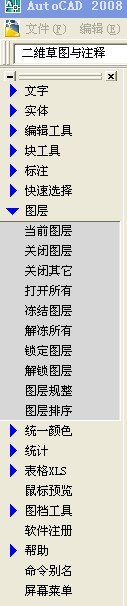
然后改成自己要用扩展命令,方法很简单,用记事本的查找,找到 当前图层 字样,把上面的图层改为怕怕吓一跳,(当然可以改成你想要的),如图
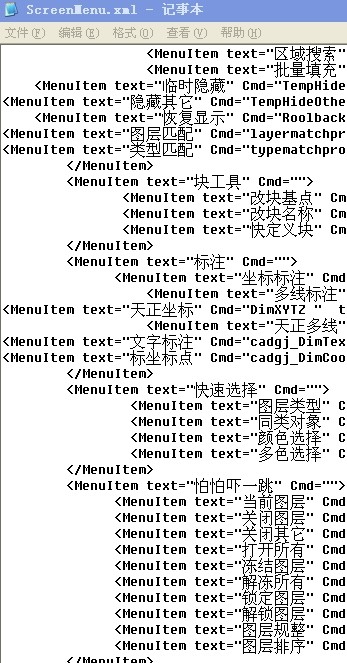
然后删除下面你不想要的,只留下一个为我们自己所用,如图
把图层排序名字改为你要扩展命令的名字,比如我要把我的把建筑底图改为8号色的小程序放进去,我就把图层排序 改成了变底图8号色,Cmd=”SortLayer “改为你扩展小程序的命令,我的变底图8号色的快捷键为g8,所以Cmd=”g8 ” ,后面的tip=”排图层显示顺序”,这个就是提示了,我改为,一捷变8号色如图:
然后保存文件, 把你的扩展程序放到C:\Program Files\AutoCAD 2008\Support目录下,打开cad,然后输入ap,点内容,出现如图
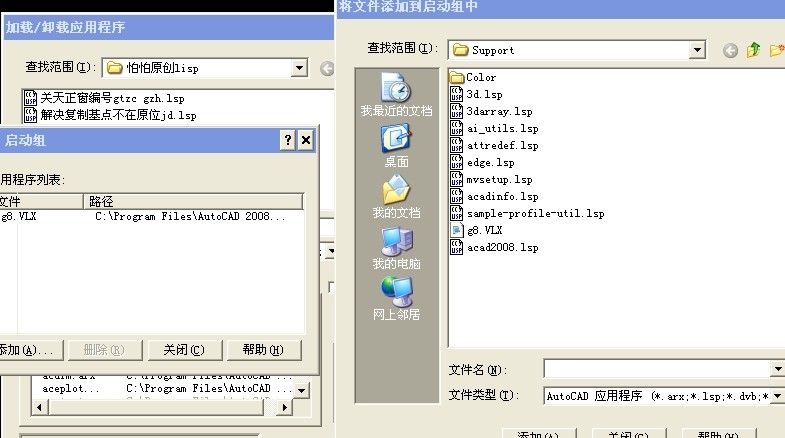
把你的扩展程序添加到自启,就ok了,屏幕右边的图层,是不是变成这样了?
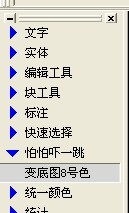
很简单的,动手一下吧,装B还是不错的,看起来很多步,其实改起来很快,只是写教程很麻烦,觉得好帮手不错的,给大家一个购买地址:http://item.taobao.com/item.htm?spm=a230r.1.14.5.HxyBWM&id=37466279364
作者人不错,支持一下吧,注册费50而已
想玩cad2015的朋友们,绿色精简版来哒
想玩玩cad2015的朋友们,一个cad2015的安装文件好几个G,难受吧,绿色精简版来哒,安装这里下载:链接: http://pan.baidu.com/s/1hqFXimS 密码: stki
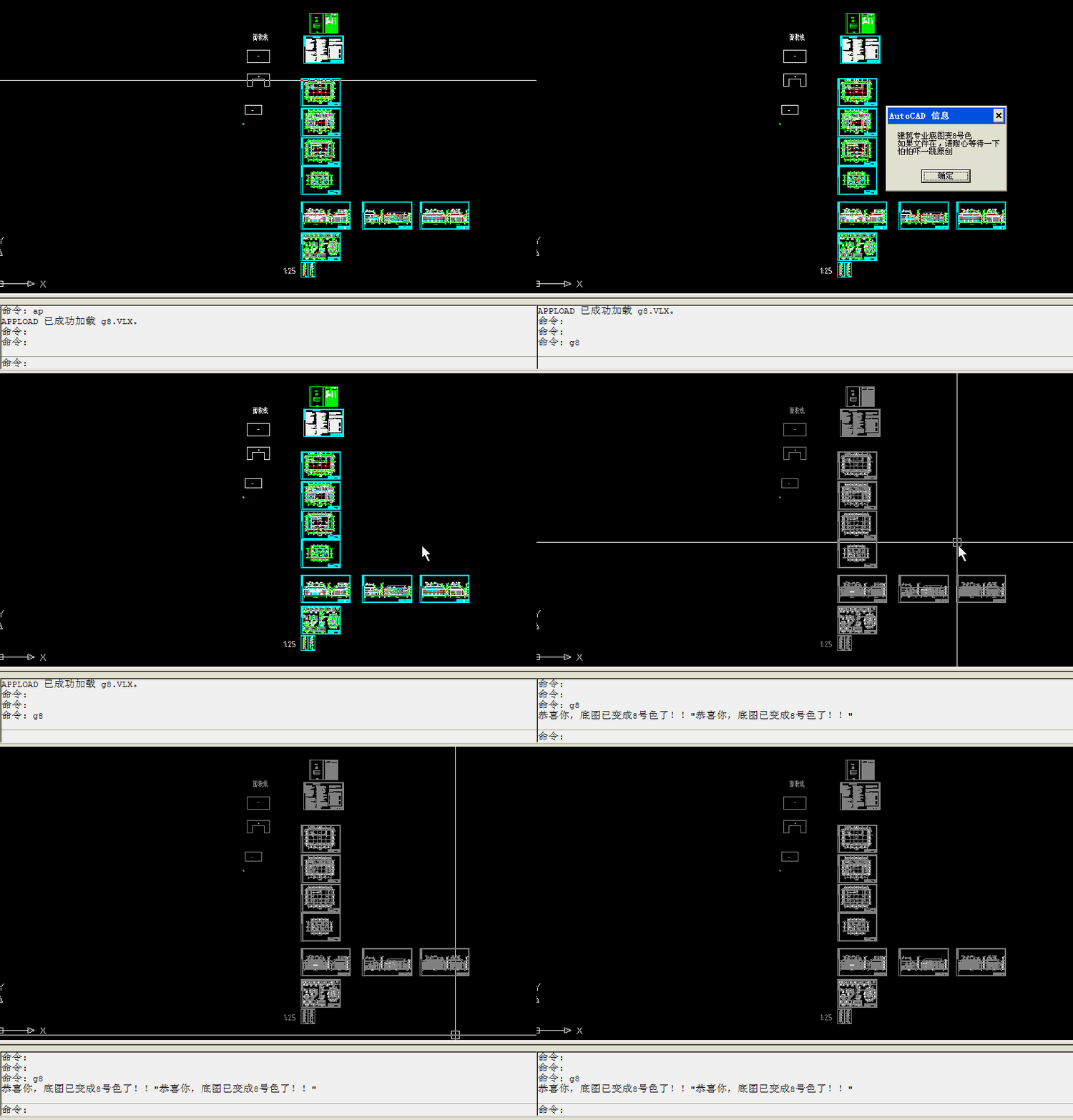
快速把其它专业图纸内容变为8号色
解决复制基点不在原位置
今天画图的时候 ,从别人画的图中拷了一点东西,结果再去做成块复制后基点不在原点,我这个小玩意就是针对这个问题的,在 cad中,输入ap,然后加载它,用快捷键jd,就能解决了,下载地址点这里:jd
快捷键关闭天正窗编号图层
天正本身自带关闭图层功能,但是门窗编号却要手动在图层里关,很不方便,把以下代码写到记事本里,然后存一个lsp文件,在cad里用ap导入,输入gc,就可以把天正门窗编号图层关闭了,也可修改成你想要关闭的图层名
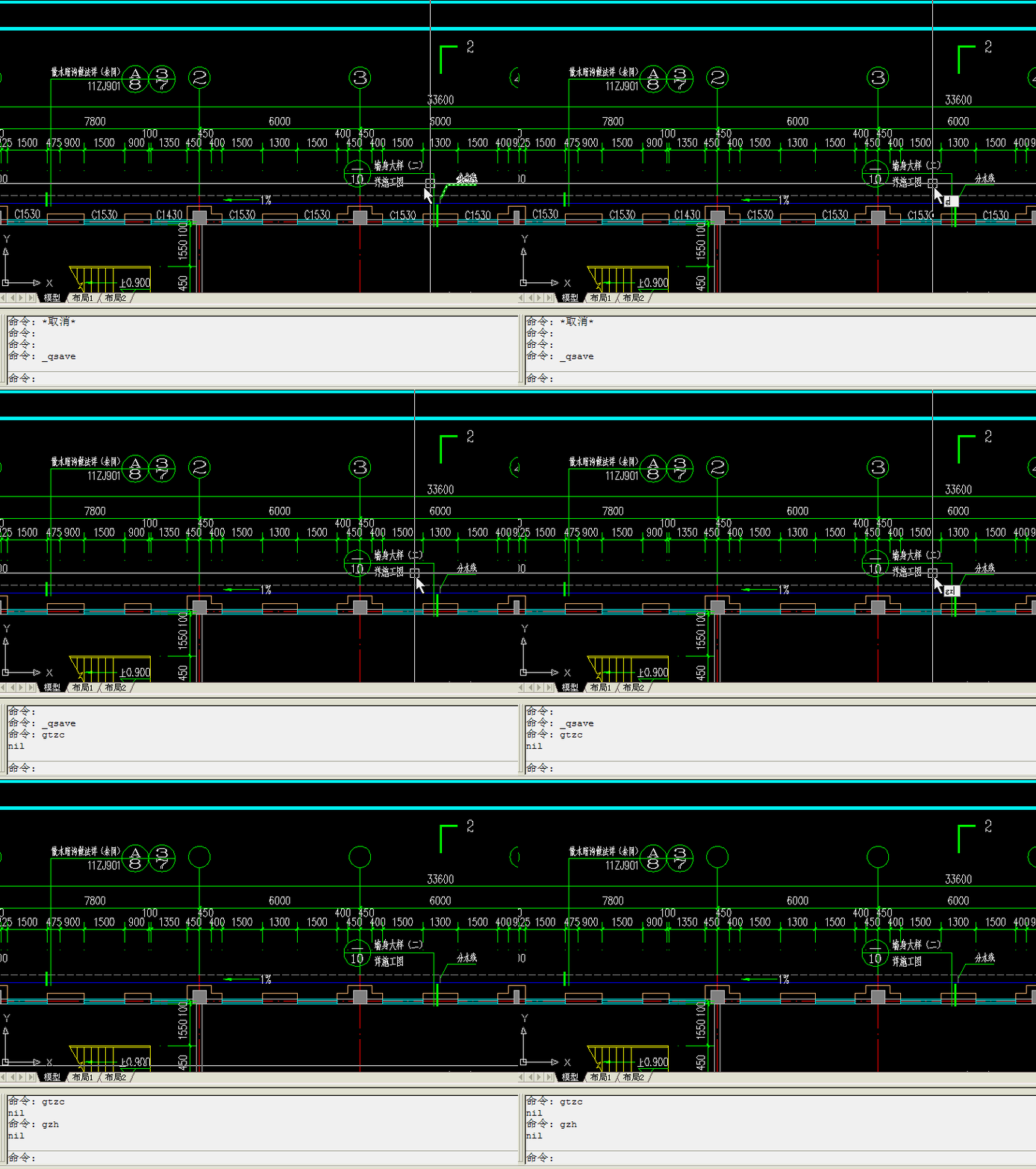
(defun c:gc()
(command “layer” “off” “window_text” “”)
)


 幂知科技
幂知科技 杭州格原
杭州格原