升级到正式版本1.0.7

更新时间:20140401

下载地址:http://www.cadgj.com/GoodAssistantUpdate/HaoBangShou 1.0.7.exe

**********************************************

图纸外发,保护您图纸的知识产权 http://www.cadgj.com/tzwf **********************************************

更新内容:

1:修补1.0.6发现的BUG

2:增加功能,两点成线和两点成四边形

3:增加功能,拷贝文字内容

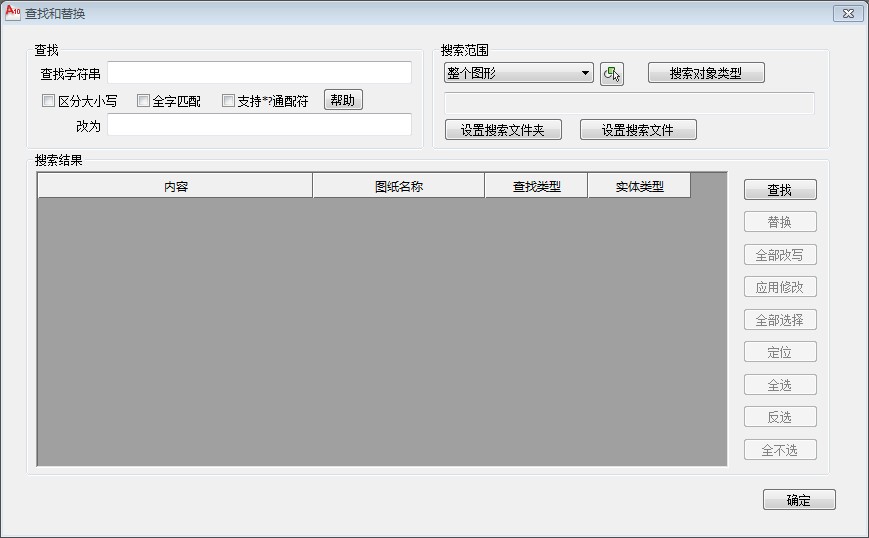
4:增加功能,查找/替换

5:增加功能,多段线标注

6:增加功能, 坐标标注表格

7:增加功能, 文字上下划线

8:增加功能,文字转大小写

9:增加功能,自由举行

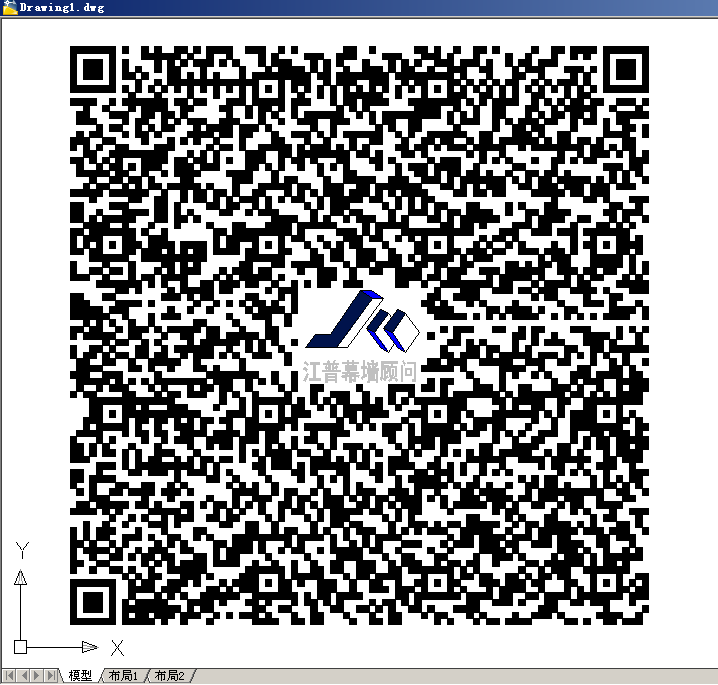
10:优化了二维码功能,使其更易识别

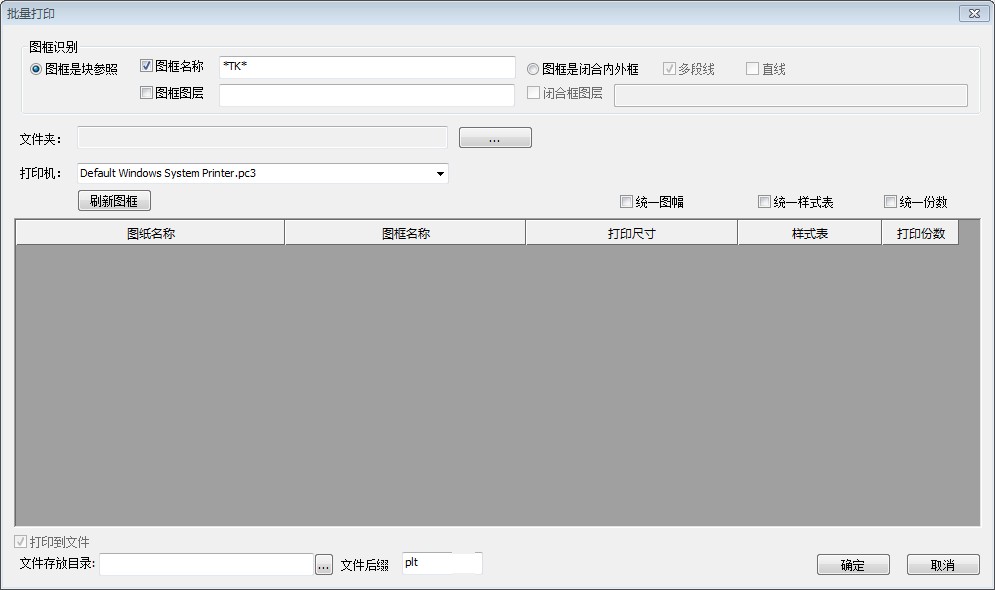
11:增加了批量打印功能

12:增加了屏幕菜单方便用户使用

13:集成专业版图纸比较功能更强大

14:支持AutoCAD2015

发表在 CAD好帮手发布 | 标签为 | 留下评论

ObjectARX调用LISP方法(含参数传递)返回值

//acrxEntryPoint.cpp

void Test()
{
struct resbuf *ptList,*ptResult=NULL;
//注意,一定要写成_T(“c:lisp_test”),写成”c:lisp_test”调用会失败
double dx=135.6;
double dy=147.5;
ptList=acutBuildList(RTSTR,_T(“c:lisp_test”),RTREAL,dx,RTREAL,dy,RTNONE);
int rc=acedInvoke(ptList,&ptResult);
if(rc!=RTNORM)
{
acutPrintf(_T(“\r\n调用LISP失败,请检查依赖的LISP是否加载”));
acutRelRb(ptList);
return;
}
acutRelRb(ptList);
if(ptResult==NULL)
{
acutPrintf(_T(“\r\n调用LISP失败,返回空值”));
return;
}
if(ptResult->restype!=RTSTR)
{
acutPrintf(_T(“\r\n调用LISP失败,返回错误的值类型”));
acutRelRb(ptResult);
return;
}
CString strRC=ptResult->resval.rstring;
acutRelRb(ptResult);
acutPrintf(_T(“\r\n返回值:%s”),strRC);
}
//—————————————————————————–
//—– ObjectARX EntryPoint
class CInvokeLispTestApp : public AcRxArxApp {

public:
CInvokeLispTestApp () : AcRxArxApp () {}

virtual AcRx::AppRetCode On_kInitAppMsg (void *pkt) {
// TODO: Load dependencies here

// You *must* call On_kInitAppMsg here
AcRx::AppRetCode retCode =AcRxArxApp::On_kInitAppMsg (pkt) ;
acedRegCmds->addCommand(_T(“InvokeLispTestApp”),_T(“Test”),_T(“Test”),0,Test);

// TODO: Add your initialization code here

return (retCode) ;
}

virtual AcRx::AppRetCode On_kUnloadAppMsg (void *pkt) {
// TODO: Add your code here

// You *must* call On_kUnloadAppMsg here
AcRx::AppRetCode retCode =AcRxArxApp::On_kUnloadAppMsg (pkt) ;

// TODO: Unload dependencies here
acedRegCmds->removeGroup(_T(“InvokeLispTestApp”));

return (retCode) ;
}

virtual void RegisterServerComponents () {
}

} ;

//—————————————————————————–
IMPLEMENT_ARX_ENTRYPOINT(CInvokeLispTestApp)


//InvokeLispTest.lsp

;;定义函数lisp_test
;;函数有两个参数x,y
;;函数名必须写成c:xx否则ARX无法调用
(defun c:lisp_test(x y)
;;将X转换成字符串
(setq strX(rtos x 2 10))
;;将Y转换成字符串
(setq strY(rtos y 2 10))
;;将X,Y转换的字符串合并起来,并返回给ARX函数
;;返回给ARX调用
;;LISP最后一个运算的返回值做为函数的返回值
(setq strXY(strcat strX “|” strY))
)

发表在 ObjectArx | 留下评论

九款让WordPress成为赚钱利器的广告插件

Blog有了很不错的流量后,看到别人博客挂的广告挣$,是否也有挂广告的冲动,但是,修改wordpress模版去让人不厌其烦,布局、样式都的重新修改一下,为了不那么麻烦,笔者整理的几款wordpress广告管理插件,方便你管理你的广告代码。

1、WordPress广告插件 AdSense Now!

AdSense Integrator插件,它可以管理不同的类型的广告,我们可以将其放到不同的页面中,主页、内容页、标签页、分类页显示任你选择,而且如果你感觉广告在文章中的对齐方式怪怪的,那么,你可以再Margins中设置,广告距各边框的距离。

下载地址:http://wordpress.la/wordpress-adsense-integrator.html

2、WordPress广告插件Easy AdSense

Easy AdSense提高了非常简单的方法为你的博客添加谷歌广告,它的功能非常的全面,通过这个插件,可以为你的AdSense找到完整的解决方案,它具有的特点是,强制每页的广告不会超过3块,自定义标题内容广告,链接添加到页眉或页脚,功能还是十分强大的。

下载地址:http://www.wordpress.la/wordpress-easy-adsense.html

3、WordPress 广告插件AdSense Integrator

AdSense Integrator插件,它可以管理不同的类型的广告,我们可以将其放到不同的页面中,主页、内容页、标签页、分类页显示任你选择,而且如果你感觉广告在文章中的对齐方式怪怪的,那么,你可以再Margins中设置,广告距各边框的距离。

下载地址:http://wordpress.la/wordpress-adsense-integrator.html

4、WordPress广告插件 Post Layout

“我不是个程序员,我不会修改模版”

* 如何添加Google Adsense代码到我的文章呢?

* 如何添加HTML/JavaScript代码到文章呢?

* 如何添加代码到特定的位置呢?

* 如何让手机用户也能看到Google Adsense呢?

Post Layout插件可以帮你解决所有的问题,这款插件具有非常强的灵活性,无论你是在文章或者页面中,都可以任意的添加JavaScript和HTML代码,你做的仅需要拷贝、粘贴这些代码,不需你会编程、更没有过多的WordPress主题修改。

下载地址:http://www.wordpress.la/wordpress-post-layout.html

5、WordPress广告插件Max Banner Ads

安装Max Banner Ads 插件后,你可以轻松的在你的WordPress博客的任何地方添加广告,而且也不需要编写代码,不仅如此,Max Banner Ads 还带有广告分析功能,可以帮助你分析广告效果,功能十分的强大。

下载地址:http://wordpress.la/max-banner-ads.html

6、WordPress自定义显示博客广告插件

Smart Ads自定义显示博客广告,可以根据文章的长度、发布时间早晚、分类,甚至文章作者来设置不同的广告。可以使用 [smartads]快捷方式来在文章或者页面调用自定义广告——广告代码直接在插件选项里面设置。如果你使用的是wp2.7版本,删除插件后,插件会自动从Mysql数据库删除相应的设定。

下载地址:http://www.wordpress.la/smart-ads.html

7、WordPress管理 Google Adsense插件

Blog有了很不错的流量后,看到别人博客挂的广告挣$,是否也有挂广告的冲动,那么,去申请个Google Adsense看看吧,这个MightyAdsense插件主要管理各式各样的Google Adsense,将Google Adsense的相关代码从后台加入后,如果以后想要更换不同的广告时,可以透过这个Plugin插件。

下载地址:http://www.wordpress.la/plugin-google-adense.html

8、WP-INSERT插件

WP-INSERT插件安装多了就会出现占用后台资源以及插件冲突等情况,实在让人厌烦,所以,WP-INSERT这款多功能插件就能帮你很大的忙,它集广告、Feed、谷歌统计、编辑、语法高亮等多项插件功能于一身,是博主管理博客的好工具。

下载地址:http://wordpress.la/wordpress-insert.html

9、All in One Adsense and YPN插件

All in One Adsense and YPN是一个开源插件,它能够自动将Google Adsense和Yahoo Publisher Network广告添加到你的文章中. 它可以自定义广告位置,颜色和显示样式。如果你对CSS和HTML很熟悉,你还可以自定更多的内容大家都知道,链接单元的作用是非常显著的,甚至强于展示广告位,对于高手而言,更是用的炉火纯青,将其效果发挥的淋漓尽致,那么对于更多的普通用户而言,我们有更简便的办法,那就是使用All in one AdSense and YPN pro。

下载地址:http://wordpress.la/wordpress-all-in-one-adsense-and-ypn.html

上面的九款插件都是非常不错的广告管理插件,有了这些插件你就不用再为网站添加广告而费心了,而且这些插件使用起来也十分的简单。

大家如果对WordPress开发感兴趣的话,中文翻译文档http://www.wordpress.la/codex.html,wordpress 开发的相关知识都有,对WordPress开发感兴趣的博主会有一定的用处。

发表在 网站建设 | 留下评论

解决AutoCAD启动出现fail to get CommcntrController

解决AutoCAD启动出现fail to get CommcntrController

方法一.在注册表中禁止”通讯中心”(下面是AUTOCAD2004的):
[HKEY_LOCAL_MACHINE\SOFTWARE\Autodesk\AutoCAD\R16.0\ACAD-201:804\Applications\WSCommCntrAcCon]
“DESCRIPTION”=”WSCommCntrAcCon”
“LOADCTRLS”=dword:00000000
“LOADER”=”C:\Program Files\AUTOCAD 2004\WSCommCntrAcCon.arx”
(解决方法:双击Loder,并将其值清空即可)
方法二.删除相关文件
删除C:\Program Files\AutoCAD2004\WSCommCntrAcCon.arx即可。

发表在 CAD技巧 | 一条评论

升级版二维码功能

最初的版本为了使二维码能够尽可能的多输入内容

将二维码的版本号设置的很高

导致了低端的手机甚至中端的手机都无法扫描出来结果。

升级版本后再原有的支持尽可能多的文字内容的基础上,增加了二维码版本动态调整技术。

只要内容在150字一下基本手机都可以轻松的很快扫描出结果。


发表在 CAD好帮手教程 | 标签为 , | 留下评论

体验版本V1.0.6.20140325

体验版本:http://pan.baidu.com/s/1mgv50iW

修改了屏幕菜单显示和命令的BUG

处理了绝大多数命令中对UCS不支持的BUG

增加了坐标点标注功能,以表格的形式标注出曲线各顶点坐标


发表在 CAD好帮手发布 | 标签为 | 留下评论

批量打印

批量打印功能主要用于实现批量打印

支持图框是块参照

或者图框是内外框

支持文件夹打印

该功能还没有完全完善,请期待继续更新……

发表在 CAD好帮手教程 | 标签为 , | 留下评论

升级版查找替换

针对CAD原有的查找替换功能做了更新

支持对文件夹进行查找

支持对文字进行通配符匹配

将来计划对内容进行逐个编辑

发表在 CAD好帮手教程 | 标签为 , | 留下评论

屏幕菜单

增加了屏幕菜单功能,方便大家使用。

如果您觉得菜单占用了位置不方便。

可以点击菜单 “屏幕菜单”可以切换屏幕菜单的状态

也就是原来是显示的,点击后切换为不显示

原来是显示的,点击后切换为不显示

并且在下次打开CAD的时候会自动恢复为关闭之前的显示或者不显示的状态

发表在 CAD好帮手教程 | 标签为 , | 留下评论

体验版本1.0.6.20140322

奉上最新体验版1.0.6.20140322

下载地址:http://pan.baidu.com/s/1hqkOnPE

1:增加屏幕菜单

2:二维码扫描比较困难

3:合并图纸比较专业版

4:隐藏其它

7:大小写转换处理文字(完成)

8:天正坐标标注(完成)

发表在 CAD好帮手发布 | 标签为 | 留下评论

体验版本V1.0.6.20140312

下载:http://pan.baidu.com/s/1jGoNAbO

增加了批量打印功能

增加了自由矩形功能

增加了文字大小写功能

增加了增加、删除 上下滑线功能

修复了删除完全重叠线的BUG

增加了文字查找功能

发表在 CAD好帮手发布 | 标签为 | 留下评论

选择集过滤

示例代码:禁止选中任何直线

下载代码

//AcEdSSGetFilterEx.h

#pragma once

class AcEdSSGetFilterEx:public AcEdSSGetFilter
{
virtual void
ssgetAddFilter(
int ssgetFlags,
AcEdSelectionSetService &service,
const AcDbObjectIdArray& selectionSet,
const AcDbObjectIdArray& subSelectionSet);
virtual void
endSSGet(
Acad::PromptStatus returnStatus,
int ssgetFlags,
AcEdSelectionSetService &service,
const AcDbObjectIdArray& selectionSet);
virtual void
endEntsel(
Acad::PromptStatus       returnStatus,
const AcDbObjectId&      pickedEntity,
const AcGePoint3d&       pickedPoint,
AcEdSelectionSetService& service);
//是否可以选中
virtual bool CanBeSelect(AcDbObjectId id);
//是否可以选中
virtual bool CanBeSelect(AcDbEntity* pEnt);
};

//AcEdSSGetFilterEx.cpp

#include “StdAfx.h”
#include “AcEdSSGetFilterEx.h”
void
AcEdSSGetFilterEx::ssgetAddFilter(
int ssgetFlags,
AcEdSelectionSetService &service,
const AcDbObjectIdArray& selectionSet,
const AcDbObjectIdArray& subSelectionSet)
{
acutPrintf(_T(“\r\nAcEdSSGetFilterEx::ssgetAddFilter\r\n”));
for(int i=subSelectionSet.logicalLength()-1;i>=0;i–)
{
if(CanBeSelect(subSelectionSet.at(i)))
{
continue;
}
service.remove(i);
}
}
void AcEdSSGetFilterEx::endSSGet(
Acad::PromptStatus returnStatus,
int ssgetFlags,
AcEdSelectionSetService &service,
const AcDbObjectIdArray& selectionSet)
{
acutPrintf(_T(“\r\nAcEdSSGetFilterEx::endSSGet\r\n”));
for(int i=selectionSet.logicalLength()-1;i>=0;i–)
{
if(CanBeSelect(selectionSet.at(i)))
{
continue;
}
service.remove(i);
}
}
void AcEdSSGetFilterEx::endEntsel(
Acad::PromptStatus       returnStatus,
const AcDbObjectId&      pickedEntity,
const AcGePoint3d&       pickedPoint,
AcEdSelectionSetService& service)
{
acutPrintf(_T(“\r\nAcEdSSGetFilterEx::endEntsel\r\n”));
if(CanBeSelect(pickedEntity))
{
return;
}
service.remove(0);
}
//是否可以选中
bool AcEdSSGetFilterEx::CanBeSelect(AcDbObjectId id)
{
AcDbEntity* pEnt=NULL;
Acad::ErrorStatus es=acdbOpenAcDbEntity(pEnt,id,AcDb::kForRead);
if(es!=Acad::eOk)
{
return false;
}
bool rc=CanBeSelect(pEnt);
pEnt->close();
return rc;
}
//是否可以选中
bool AcEdSSGetFilterEx::CanBeSelect(AcDbEntity* pEnt)
{
return true;
}

//MySSGetFilter.h

#pragma once
#include “AcEdSSGetFilterEx.h”
class MySSGetFilter: public AcEdSSGetFilterEx
{
public:
//是否可以选中
virtual bool CanBeSelect(AcDbEntity* pEnt);
};

//MySSGetFilter.cpp

#include “StdAfx.h”
#include “MySSGetFilter.h”
//是否可以选中
bool MySSGetFilter::CanBeSelect(AcDbEntity* pEnt)
{
if(pEnt->isKindOf(AcDbLine::desc()))
{
return false;
}
else
{
return true;
}
}

//acrxEntryPoint.cpp

#include “StdAfx.h”
#include “resource.h”
#include “MySSGetFilter.h”
MySSGetFilter m_filter;
//—————————————————————————–
#define szRDS _RXST(“”)

//—————————————————————————–
//—– ObjectARX EntryPoint
class CSSGetFilterTestApp : public AcRxArxApp {

public:
CSSGetFilterTestApp () : AcRxArxApp () {}

virtual AcRx::AppRetCode On_kInitAppMsg (void *pkt) {
// TODO: Load dependencies here

// You *must* call On_kInitAppMsg here
AcRx::AppRetCode retCode =AcRxArxApp::On_kInitAppMsg (pkt) ;

addSSgetFilterInputContextReactor(curDoc(), &m_filter);

// TODO: Add your initialization code here

return (retCode) ;
}

virtual AcRx::AppRetCode On_kUnloadAppMsg (void *pkt) {
// TODO: Add your code here

// You *must* call On_kUnloadAppMsg here
AcRx::AppRetCode retCode =AcRxArxApp::On_kUnloadAppMsg (pkt) ;

removeSSgetFilterInputContextReactor(curDoc(), &m_filter);

// TODO: Unload dependencies here

return (retCode) ;
}

virtual void RegisterServerComponents () {
}

} ;

//—————————————————————————–
IMPLEMENT_ARX_ENTRYPOINT(CSSGetFilterTestApp)

发表在 ObjectArx | 标签为 , | 留下评论

VC 快速枚举系统所有字体

转载:http://www.cnblogs.com/mars9/archive/2012/01/13/2321622.html

int EnumFontFamiliesEx(
HDC hdc,                          // handle to DC
LPLOGFONT lpLogfont,              // font information
FONTENUMPROC lpEnumFontFamExProc, // callback function
LPARAM lParam,                    // additional data
DWORD dwFlags                     // not used; must be 0
);

Combobox  m_Combo;

INT CALLBACK NEnumFontNameProc(LOGFONT *plf, TEXTMETRIC* /*ptm*/, INT /*nFontType*/, LPARAM lParam)
{
CComboBox* comboBox = (CComboBox*) lParam;

comboBox->AddString(plf->lfFaceName);

return TRUE;
}

///////////////列举本机所有字体
::EnumFontFamilies(GetDC()->m_hDC, (LPTSTR) NULL, (FONTENUMPROC)NEnumFontNameProc, (LPARAM)&(m_Combo));
int nCount = m_Combo.GetCount();
if (nCount > 0)
m_Combo.SetCurSel(nCount-5);
else
m_Combo.SetCurSel(0);

发表在 C++ | 标签为 | 留下评论

MFC中CTreeCtrl奇怪的SetCheck

转载:http://blog.csdn.net/feihuadao/article/details/6136683

MFC中CTreeCtrl奇怪的SetCheck 收藏
一、问题的提出

CTreeCtrl有个属性TVS_HASBUTTONS,如果创建控件的时候加上了这个属性,则在每个节点的左侧
都有一个按钮,用来表示节点的选择状态。通过两个函数SetCheck / GetCheck来设置和获取指定
节点的选择状态。

但是奇怪的是,在对话框中按照常规的方法使用了SetCheck,最后CTreeCtrl并没有显示节点被选
中,下面是测试例子:

1、用wizard创建一个对话框工程,并且在上面放置一个CTreeCtrl控件。
2、设置CTreeCtrl的属性,”More Styles”里面选中”Check Boxes”,给它加上复选框。
3、对话框初始化的时候,给CTreeCtrl控件添加节点,并设置选中。代码如下:

BOOL CTestCheckDlg::OnInitDialog()
{
CDialog::OnInitDialog();
。。。
// TODO: Add extra initialization here
HTREEITEM hRoot = m_Tree.InsertItem(“Root”);
m_Tree.SetCheck(hRoot);
m_Tree.InsertItem(“Child1”, hRoot);
m_Tree.InsertItem(“Child2”, hRoot);
m_Tree.Expand(hRoot, TVE_EXPAND );

return TRUE;
}

但是,对话框运行以后,树控件的根节点并没有显示被选中。用GetCheck测试,返回FALSE。但是
如果在OnInitDialog里面SetCheck以后,立刻用GetCheck测试,发现返回的却是TRUE。

进一步测试可以发现,对话框显示以后,任何时候再次使用SetCheck都没有问题了。

二、问题分析

由于无法直接监视树控件根节点状态的变化,为了弄清楚树控件究竟是什么时候修改了我们设置的
check状态,我在其他消息响应函数中进一步用GetCheck检查,发现对话框在第一次OnPaint的时候
,树控件根节点的check状态还是选中的,但紧接着下个消息来到后,它的状态就发生了改变。我
思来想去肯定是树控件本身的问题。可能是它第一次画自己的时候,修改了每个节点的选择状态。

但是它为何这么做?我开始猜测和它的图表列表有关系。为了验证这个想法,加入下面的代码:

CImageList* pStateIcon = m_Tree.GetImageList(TVSIL_STATE);
int nItem = (pStateIcon == NULL)?(0):(pStateIcon->GetImageCount());
CString str;
str.Format(“Count of State Icon: %d/n”, nItem);
TRACE(str);

果然不出所料,测试结果发现,在OnInitDialog里面,树控件虽然添加了数据,但是它的State Icon
并没有加载,ImageList是空的。一旦它显示自己后,ImageList就不是NULL了,里面的图标数目是3。
也就是说它使用了3个图标。

显然是树控件在创建自己的时候,并没有加载所需的图标列表,而是在显示的时候,发现需要后,它才
加载,并且重新复位了每个节点的选择状态。它之所以这么做,我想可能是出于效率方面的考虑。也就
是说,如果用户没有添加TVS_HASBUTTONS,那么它就不需要这个图标列表了。

三、解决问题

既然知道了问题的所在,那么鉴于在对话框初始化的时候,设置树控件的数据和选择状态是一个常规的
做法,我就不打算修改这些代码的位置,而采用提前给它加载图标列表的方法。方法如下:

1、在资源中添加一个位图资源IDB_BITMAP1,尺寸拉伸成48*16。(长48,高16,共三个图标)
2、在位图上面画三个图标,每个大小都是16*16,第二个是X,第三个是选择(对勾)。至于第一个
的用途,还不清楚。
3、在对话框的头文件中,添加一个CImageList对象:
CImageList m_ImageList;
4、在对话框初始化函数中,添加如下代码:

m_ImageList.Create(IDB_BITMAP1, 16,3,RGB(255,255,255));
m_Tree.SetImageList(&m_ImageList, TVSIL_STATE);
运行以后,发现问题已经解决。只不过树控件的状态图标已经换成了自己的,可以弄得更好看一些。

以上代码的测试环境(VS2003.net+xp)
===================================================================


关于CTreeCtrl中SetCheck的bug问题

MFC


对于对话框中的TreeCtrl和TreeView控件,我们往往想在初始化(OnInitDialog)中使用SetCheck()方法,将默认的值处于选中状态.但是向我们这些菜鸟往往会发现事与愿违,不管是怎么样就是得不到任何一个选项处于Check状态.

我用了多线程,有时会出现打勾,更多的时候是徒劳的,出不出现打勾好像是随机,也像是它在跟我在开玩笑. 根据别人的建议,我在使用了计时器,但如果像别人所说使用延时为零为计时器,我仍得不到效果,只有当时间设到0.5秒以上时,才能达到目的,估计是要等初始化(OnInitDialog).

差强人意的效果完成之后,我又来查资料,这时看到一个比较好的说明:

对于对话框中的TreeView控件,如果想在初始化(OnInitDialog)中SetCheck,必须:
m_tree.ModifyStyle( TVS_CHECKBOXES, 0 );
m_tree.ModifyStyle( 0, TVS_CHECKBOXES );
m_tree.SetCheck(hItem, TRUE);
即即使在对话框编辑器中为TreeView增加了Check Boxes属性,也必须重新设一次TVS_CHECKBOXES,SetCheck才能起作用
而对于非初始化中的SetCheck,则不受影响

发表在 C++ | 标签为 , | 留下评论

一个Edit控件的扩展类

一、 一个Edit控件的扩展类
转:http://hi.baidu.com/%CF%FB%BB%EA%D2%B9/blog/item/4711ce1a457cb10c35fa41fe.html
 
自己写的一个Edit控件的扩展类(源码)修改版
2010年01月17日 星期日 下午 04:35

#if !defined(AFX_COOLEDIT_H__3F4B9BD7_EFF9_45F5_AD79_EEF2B95742B3__INCLUDED_)
#define AFX_COOLEDIT_H__3F4B9BD7_EFF9_45F5_AD79_EEF2B95742B3__INCLUDED_

#if _MSC_VER > 1000
#pragma once
#endif // _MSC_VER > 1000
// CoolEdit.h : header file
//
/*
作者:段晓辉
版本:2.0
功能:对标准的Edit控件进行扩展,可以在标准的控件中加入小位图,
并可以改变背景、文字的颜色和文字的字体。
接口: void SetEditFont(LPLOGFONT lpFont);////功能:设置编辑框的字体
void SetTextColor(COLORREF textColor);//功能:设置编辑框字体的颜色
void SetBkColor(COLORREF bkColor);//功能:设置编辑框的背景颜色
void LoadBitmap(UINT bmpID);//功能:在编辑框内增加位图
void SetClearBk(BOOL bClearBk = TRUE);//功能:设置是否对图标的背景进行去除操作,默认为清除。
void SetClearColor(COLORREF clearColor = RGB(255, 255, 255));//设置要去除的颜色。
修改: 1、修改了小图标不能和编辑框相匹配的问题
2、修改了当改变编辑框背景色时,图标有边框(背景)的问题
*/
/////////////////////////////////////////////////////////////////////////////
// CCoolEdit window

class CCoolEdit : public CEdit
{
// Construction
public:
CCoolEdit();

// Attributes
public:

// Operations
public:

// Overrides
// ClassWizard generated virtual function overrides
//{{AFX_VIRTUAL(CCoolEdit)
//}}AFX_VIRTUAL

// Implementation
public:
void SetClearColor(COLORREF clearColor = RGB(255, 255, 255));
void SetClearBk(BOOL bClearBk = TRUE);
void SetEditFont(LPLOGFONT lpFont);
void SetTextColor(COLORREF textColor);
void SetBkColor(COLORREF bkColor);
void LoadBitmap(UINT bmpID);
virtual ~CCoolEdit();

// Generated message map functions
protected:

//{{AFX_MSG(CCoolEdit)
afx_msg BOOL OnEraseBkgnd(CDC* pDC);
afx_msg HBRUSH CtlColor(CDC* pDC, UINT nCtlColor);
afx_msg void OnSetFocus(CWnd* pOldWnd);
afx_msg void OnChange();
//}}AFX_MSG

DECLARE_MESSAGE_MAP()
private:
COLORREF m_clearColor;
BOOL m_bClearBk;
CFont m_font;
CBrush m_brush;
COLORREF m_colBack;//背景颜色
COLORREF m_colText;//文本颜色
CBitmap m_bmpBack;//用于保存加载的位图
BITMAP bmpBack;
};

/////////////////////////////////////////////////////////////////////////////

//{{AFX_INSERT_LOCATION}}
// Microsoft Visual C++ will insert additional declarations immediately before the previous line.

#endif // !defined(AFX_COOLEDIT_H__3F4B9BD7_EFF9_45F5_AD79_EEF2B95742B3__INCLUDED_)


// CoolEdit.cpp : implementation file
//

#include “stdafx.h”
//#include “wdm.h”
#include “CoolEdit.h”

#ifdef _DEBUG
#define new DEBUG_NEW
#undef THIS_FILE
static char THIS_FILE[] = __FILE__;
#endif

/////////////////////////////////////////////////////////////////////////////
// CCoolEdit

CCoolEdit::CCoolEdit()
{
this->m_colBack = RGB(255, 255, 255);
this->m_colText = RGB(0, 0, 0);
this->m_brush.CreateStockObject(NULL_BRUSH);
this->m_bClearBk = TRUE;
this->m_clearColor = RGB(255, 255, 255);
}

CCoolEdit::~CCoolEdit()
{
}
BEGIN_MESSAGE_MAP(CCoolEdit, CEdit)
//{{AFX_MSG_MAP(CCoolEdit)
ON_WM_ERASEBKGND()
ON_WM_CTLCOLOR_REFLECT()
ON_WM_SETFOCUS()
ON_CONTROL_REFLECT(EN_CHANGE, OnChange)
//}}AFX_MSG_MAP
END_MESSAGE_MAP()

/////////////////////////////////////////////////////////////////////////////
// CCoolEdit message handlers
//功能:绘制背景
BOOL CCoolEdit::OnEraseBkgnd(CDC* pDC)
{
// TODO: Add your message handler code here and/or call default
if(this->m_bmpBack.GetSafeHandle() != NULL)
{
   CDC dcMem;
   dcMem.CreateCompatibleDC(pDC);
   CBitmap *pOldBitmap = dcMem.SelectObject(&m_bmpBack);

   CRect re;
   CBrush brush;
   GetClientRect(&re);
   brush.CreateSolidBrush(m_colBack);
   pDC->FillRect(&re, &brush);

   COLORREF Old = dcMem.SetBkColor(this->m_clearColor);
//   pDC->BitBlt(0, 0, bmpBack.bmWidth, bmpBack.bmHeight, &dcMem, 0, 0, SRCCOPY);
   int bl = bmpBack.bmWidth/bmpBack.bmHeight;

   if(this->m_bClearBk)
   {
    pDC->StretchBlt(0, 0, re.Height()*bl, re.Height(), &dcMem, 0, 0, bmpBack.bmWidth, bmpBack.bmHeight, SRCINVERT);

    CDC dcMask;
    dcMask.CreateCompatibleDC(pDC);
    CBitmap bitmapMask;
    bitmapMask.CreateBitmap(re.Height()*bl, re.Height(), 1, 1, NULL); //把mask位图装入mask DC
    CBitmap* pOldBitmapMask = dcMask.SelectObject(&bitmapMask); //用透明色创建“掩码”位图  
    dcMask.StretchBlt(0, 0, re.Height()*bl, re.Height(), &dcMem, 0, 0, bmpBack.bmWidth, bmpBack.bmHeight, SRCCOPY);

    pDC->BitBlt(0, 0, re.Height()*bl, re.Height(), &dcMask, 0, 0, SRCAND);
    pDC->StretchBlt(0, 0, re.Height()*bl, re.Height(), &dcMem, 0, 0, bmpBack.bmWidth, bmpBack.bmHeight, SRCINVERT);
   }
   else
   {
    pDC->StretchBlt(0, 0, re.Height()*bl, re.Height(), &dcMem, 0, 0, bmpBack.bmWidth, bmpBack.bmHeight, SRCCOPY);

   }

   dcMem.SelectObject(pOldBitmap);
   dcMem.SetBkColor(Old);
   return TRUE;
}

return CEdit::OnEraseBkgnd(pDC);
}
//功能:加载位图资源并依附于m_bmpBack对象
void CCoolEdit::LoadBitmap(UINT bmpID)
{
if(this->m_bmpBack.GetSafeHandle() != NULL)
{
   this->m_bmpBack.DeleteObject();
   this->m_bmpBack.LoadBitmap(bmpID);
}
else
{
   this->m_bmpBack.LoadBitmap(bmpID);
}
this->m_bmpBack.GetBitmap(&bmpBack);
// this->m_bmpBack.GetBitmap(&bmpChange);

}

 
HBRUSH CCoolEdit::CtlColor(CDC* pDC, UINT nCtlColor)
{
pDC->SetBkMode(TRANSPARENT);
pDC->SetTextColor(this->m_colText);
pDC->SetBkColor(this->m_colBack);

if(this->m_bmpBack.GetSafeHandle() == NULL)
{
   this->m_brush.DeleteObject();
   this->m_brush.CreateSolidBrush(this->m_colBack);
   return this->m_brush;
}
else
{
   return this->m_brush;
}

// TODO: Return a non-NULL brush if the parent’s handler should not be called
// return NULL;
}
//功能:当编辑框获得焦点时,设置光标的正确位置
void CCoolEdit::OnSetFocus(CWnd* pOldWnd)
{

// TODO: Add your message handler code here
if(this->m_bmpBack.GetSafeHandle() != NULL)
{
   int bl = bmpBack.bmWidth/bmpBack.bmHeight;

///   SetMargins(this->bmpBack.bmWidth,1);
   CRect re;
   GetClientRect(&re);

   SetMargins(re.Height()*bl,1);
}

CEdit::OnSetFocus(pOldWnd);
}

void CCoolEdit::OnChange()
{
// TODO: If this is a RICHEDIT control, the control will not
// send this notification unless you override the CEdit::OnInitDialog()
// function and call CRichEditCtrl().SetEventMask()
// with the ENM_CHANGE flag ORed into the mask.

// TODO: Add your control notification handler code here
Invalidate();

}
//功能:设置编辑框的背景颜色
void CCoolEdit::SetBkColor(COLORREF bkColor)
{
this->m_colBack = bkColor;
Invalidate();
}
//功能:设置编辑框字体的颜色
void CCoolEdit::SetTextColor(COLORREF textColor)
{
this->m_colText = textColor;
Invalidate();
}
//功能:设置编辑框的字体
void CCoolEdit::SetEditFont(LPLOGFONT lpFont)
{
if(m_font.GetSafeHandle() != NULL)
{
   m_font.DeleteObject();
}
m_font.CreateFontIndirect(lpFont);
SetFont(&m_font);

}


void CCoolEdit::SetClearBk(BOOL bClearBk)
{
this->m_bClearBk = bClearBk;

}

void CCoolEdit::SetClearColor(COLORREF clearColor)
{
this->m_clearColor = clearColor;

}


二、 在evc下面的edit控件背景贴图

转:http://hi.baidu.com/%CA%AE%C6%DF%C8%D5%D4%C2/blog/item/0f767aec61380836279791ac.html


这个是很久以前写的程序了。这里贴出来是为了方便以后找资料。
下面的是头文件的代码:
//EditCtrl.h
#if !defined(AFX_EDITCTRL_H__DCBB58E6_7C67_4656_9CA1_BE3793A759FA__INCLUDED_)
#define AFX_EDITCTRL_H__DCBB58E6_7C67_4656_9CA1_BE3793A759FA__INCLUDED_

#if _MSC_VER > 1000
#pragma once
#endif // _MSC_VER > 1000
// EditCtrl.h : header file
//
#include   <Sipapi.h>
/////////////////////////////////////////////////////////////////////////////
// CEditCtrl window

class CEditCtrl : public CEdit
{
// Construction
public:
CEditCtrl();

// Attributes
public:
CBitmap* m_MainBmp;
CBitmap *m_pOldMianBmp;
BOOL    flag;
int   Width;
int     Height;
BOOL    IsPanDown;

HIMC    m_hImc;

// Operations
public:

// Overrides
// ClassWizard generated virtual function overrides
//{{AFX_VIRTUAL(CEditCtrl)
protected:
virtual BOOL PreCreateWindow(CREATESTRUCT& cs);
//}}AFX_VIRTUAL

// Implementation
public:
void SetInvalidate(BOOL bPanDown =FALSE);
void GetBkBmp(CBitmap* bkbmp);
virtual ~CEditCtrl();

// Generated message map functions
protected:
//{{AFX_MSG(CEditCtrl)
afx_msg HBRUSH CtlColor(CDC* pDC, UINT nCtlColor);
afx_msg BOOL OnEraseBkgnd(CDC* pDC);
afx_msg void OnChange();
afx_msg void OnLButtonUp(UINT nFlags, CPoint point);
afx_msg void OnMouseMove(UINT nFlags, CPoint point);
afx_msg void OnLButtonDown(UINT nFlags, CPoint point);
//}}AFX_MSG

DECLARE_MESSAGE_MAP()
};

/////////////////////////////////////////////////////////////////////////////

//{{AFX_INSERT_LOCATION}}
// Microsoft Visual C++ will insert additional declarations immediately before the previous line.

#endif // !defined(AFX_EDITCTRL_H__DCBB58E6_7C67_4656_9CA1_BE3793A759FA__INCLUDED_)

//下面是源文件的代码:
//EditCtrl.cpp
// EditCtrl.cpp : implementation file
//

#include “StdAfx.h”
#include “2530templatedll.h”
#include “EditCtrl.h”

#ifdef _DEBUG
#define new DEBUG_NEW
#undef THIS_FILE
static char THIS_FILE[] = __FILE__;
#endif

/////////////////////////////////////////////////////////////////////////////
// CEditCtrl
CEditCtrl::CEditCtrl()
{
flag   =FALSE;
Width =0;
Height =0;
IsPanDown =FALSE;
}
CEditCtrl::~CEditCtrl()
{

}
BEGIN_MESSAGE_MAP(CEditCtrl, CEdit)
//{{AFX_MSG_MAP(CEditCtrl)
ON_WM_CTLCOLOR_REFLECT()
ON_WM_ERASEBKGND()
ON_CONTROL_REFLECT(EN_CHANGE, OnChange)
ON_WM_LBUTTONUP()
ON_WM_MOUSEMOVE()
ON_WM_LBUTTONDOWN()
//}}AFX_MSG_MAP
END_MESSAGE_MAP()

/////////////////////////////////////////////////////////////////////////////
// CEditCtrl message handlers

HBRUSH CEditCtrl::CtlColor(CDC* pDC, UINT nCtlColor)
{
// TODO: Change any attributes of the DC here
pDC->SetBkMode(TRANSPARENT); ///选择透明背景模式
return HBRUSH(GetStockObject(HOLLOW_BRUSH));
return NULL;
}
BOOL CEditCtrl::OnEraseBkgnd(CDC* pDC)
{
// TODO: Add your message handler code here and/or call default
CDC m_MianDC;

//创建与内存兼容的DC
m_MianDC.CreateCompatibleDC(pDC);
m_pOldMianBmp =m_MianDC.SelectObject(m_MainBmp);
pDC->BitBlt(0, 0, Width, Height, &m_MianDC, 0, 0, SRCCOPY);
m_MianDC.SelectObject(m_pOldMianBmp);
m_MianDC.DeleteDC();

return TRUE;
}

void CEditCtrl::OnChange()
{
// TODO: Add your control notification handler code here
Invalidate();
}

void CEditCtrl::OnLButtonUp(UINT nFlags, CPoint point)
{
// TODO: Add your message handler code here and/or call default
if(!IsPanDown)
   Invalidate();
else
{
   ::SetCapture(NULL);
   ClientToScreen(&point);
   GetParent()->SendMessage(WM_LBUTTONUP, (WPARAM)m_hWnd, (LPARAM)MAKELONG(point.x,point.y));
}
CEdit::OnLButtonUp(nFlags, point);
}

void CEditCtrl::GetBkBmp(CBitmap* bkbmp)
{
BITMAP bm;

m_MainBmp =bkbmp;
//将位图资源与句柄绑定
m_MainBmp->GetObject(sizeof(BITMAP),&bm);
   
Width =bm.bmWidth;
Height =bm.bmHeight;
/*
CString str;
str.Format(_T(“%d,%d”),Width,Height);
AfxMessageBox(str);
*/
}

void CEditCtrl::OnMouseMove(UINT nFlags, CPoint point)
{
// TODO: Add your message handler code here and/or call default
::SetCapture(NULL);
ClientToScreen(&point);
GetParent()->SendMessage(WM_MOUSEMOVE, (WPARAM)m_hWnd, (LPARAM)MAKELONG(point.x,point.y));
CEdit::OnMouseMove(nFlags, point);
}

void CEditCtrl::OnLButtonDown(UINT nFlags, CPoint point)
{
// TODO: Add your message handler code here and/or call default
::SetCapture(NULL);
ClientToScreen(&point);
GetParent()->SendMessage(WM_LBUTTONDOWN, (WPARAM)m_hWnd, (LPARAM)MAKELONG(point.x,point.y));
CEdit::OnLButtonDown(nFlags, point);
}

void CEditCtrl::SetInvalidate(BOOL bPanDown)
{
IsPanDown =bPanDown;
}

BOOL CEditCtrl::PreCreateWindow(CREATESTRUCT& cs)
{
// TODO: Add your specialized code here and/or call the base class

return CEdit::PreCreateWindow(cs);
}

发表在 C++ | 标签为 , | 留下评论

*?通配符

通配符*表示匹配任何内容,但是不能匹配空的内容
通配符?表示匹配任何内容,包含空的内容
例如”*线”可以匹配”进线”或者”出线”但是不能匹配”线”
“?线”可以匹配”进线”或者”出线”也同时能匹配”线”

//GStringMatch.h
#pragma once

class GStringMatch
{
public:
 GStringMatch(void);
public:
 ~GStringMatch(void);
 //是否匹配
 //str是否符合strMatch的描述
 bool IsMatch(CString str,CString strMatch);
 bool m_bIngoreCase;//忽略大小写
private:
 bool IsMatch(CString str,CStringArray& strMatchArray);
};

//GStringMatch.cpp
#include “StdAfx.h”
#include “GStringMatch.h”

GStringMatch::GStringMatch(void)
{
 m_bIngoreCase=true;
}

GStringMatch::~GStringMatch(void)
{
}
//是否匹配
bool GStringMatch::IsMatch(CString str,CString strMatch)
{
 if(str.IsEmpty())
 {
  return false;
 }
 if(strMatch.IsEmpty())
 {
  return false;
 }
 if(m_bIngoreCase)
 {
  //忽略大小写
  str.MakeUpper();
  strMatch.MakeUpper();
 }
 CStringArray strMatchArray;
 CString strTmp=_T(“”);
 for(int i=0;i<strMatch.GetLength();i++)
 {
  TCHAR c=strMatch.GetAt(i);
  if(c==_T(‘*’))
  {
   if(!strTmp.IsEmpty())
   {
    strMatchArray.Add(strTmp);
    strTmp=_T(“”);
   }
   if(strMatchArray.GetCount()==0)
   {
    strMatchArray.Add(_T(“*”));
   }
   else
   {
    if(strMatchArray.GetAt(strMatchArray.GetCount()-1).Compare(_T(“*”))!=0&&
     strMatchArray.GetAt(strMatchArray.GetCount()-1).Compare(_T(“?”))!=0)
    {
     //两个连续的*号没有意义
     //*?也是没有意义的
     strMatchArray.Add(_T(“*”));
    }
   }
  }
  else if(c==_T(‘?’))
  {
   if(!strTmp.IsEmpty())
   {
    strMatchArray.Add(strTmp);
    strTmp=_T(“”);
   }
   if(strMatchArray.GetCount()==0)
   {
    strMatchArray.Add(_T(“?”));
   }
   else
   {
    if(strMatchArray.GetAt(strMatchArray.GetCount()-1).Compare(_T(“*”))!=0&&
     strMatchArray.GetAt(strMatchArray.GetCount()-1).Compare(_T(“?”))!=0)
    {
     strMatchArray.Add(_T(“?”));
    }
    else if(strMatchArray.GetAt(strMatchArray.GetCount()-1).Compare(_T(“*”))==0)
    {
     //*?其实相当于?
     strMatchArray.SetAt(strMatchArray.GetCount()-1,_T(“?”));
    }
    else if(strMatchArray.GetAt(strMatchArray.GetCount()-1).Compare(_T(“?”))==0)
    {
     //??相当于?
    }
   }
  }
  else
  {
   strTmp+=c;
   if(i==strMatch.GetLength()-1)
   {
    strMatchArray.Add(strTmp);
   }
  }
 }
 if(strMatchArray.GetCount()==0)
 {
  return false;
 }
 return IsMatch(str,strMatchArray);
}
bool GStringMatch::IsMatch(CString str,CStringArray& strMatchArray)
{
 if(strMatchArray.GetCount()==0)
 {
  if(str.IsEmpty())
  {
   return true;
  }
  else
  {
   return false;
  }
 }
 CString strMatch0=strMatchArray.GetAt(0);
 if(strMatch0.CompareNoCase(_T(“*”))==0)
 {
  if(strMatchArray.GetCount()==1)
  {
   if(str.IsEmpty())
   {
    return false;
   }
   else
   {
   return true;
   }
  }
  CString strMatch1=strMatchArray.GetAt(1);
  int nIndex=str.Find(strMatch1);
  if(nIndex<0)
  {
   return false;
  }
  if(nIndex==0)
  {
   //*不能匹配空内容
   return false;
  }
  int nLen=str.GetLength()-(nIndex+strMatch1.GetLength());
  str=nLen>0?str.Right(nLen):_T(“”);
  strMatchArray.RemoveAt(0);
  strMatchArray.RemoveAt(0);
  return IsMatch(str,strMatchArray);

 }
 else if(strMatch0.CompareNoCase(_T(“?”))==0)
 {
  if(strMatchArray.GetCount()==1)
  {
   return true;
  }
  CString strMatch1=strMatchArray.GetAt(1);
  int nIndex=str.Find(strMatch1);
  if(nIndex<0)
  {
   return false;
  }
  int nLen=str.GetLength()-(nIndex+strMatch1.GetLength());
  str=nLen>0?str.Right(nLen):_T(“”);
  strMatchArray.RemoveAt(0);
  strMatchArray.RemoveAt(0);
  return IsMatch(str,strMatchArray);
 }
 else
 {
  if(str.GetLength()<strMatch0.GetLength())
  {
   return false;
  }
  CString str0=str.Left(strMatch0.GetLength());
  if(str0.Compare(strMatch0)!=0)
  {
   return false;
  }
  int nLen=str.GetLength()-strMatch0.GetLength();
  str=nLen>0?str.Right(nLen):_T(“”);
  strMatchArray.RemoveAt(0);
  return IsMatch(str,strMatchArray);
 }
}


发表在 C++ | 标签为 | 留下评论

拷贝文字到剪贴板中

//功能: 将CString转换成char*,自动区分UNICODE和ASCII
//参数: swString,需要转化的字符串
//      szBuffer,char*指针,使用完后记得使用free释放
//返回:
void ConvertToLPCSTR(char*& szBuf,CString swString)
{
#ifdef _UNICODE
 szBuf = NULL;
 UINT  nLen  = NULL;

 nLen = WideCharToMultiByte(CP_ACP, 0, swString/*wszString*/, -1, NULL, 0, NULL, NULL);

 szBuf = (char*)malloc(nLen + 1);

 int nRet = WideCharToMultiByte(CP_ACP, 0, swString, -1, szBuf, nLen, NULL, NULL);

 if (0 == nRet)
 {
  free(szBuf);
  szBuf = NULL;
 }
#else
 szBuf = NULL;
 int nLen=swString.GetLength()+1;
 szBuf = (char*)malloc(nLen + 1);
 strcpy(szBuf,swString);
#endif
}
//拷贝文字到剪贴板中
BOOL CopyTextToClipboard(CString strText,HWND hWnd=NULL)
{
 BOOL rc=OpenClipboard(hWnd);
 if(!rc)
  return rc;
 EmptyClipboard();
 char* szBuf=NULL;
 ConvertToLPCSTR(szBuf,strText);
 DWORD cch=strlen(szBuf);
 HGLOBAL hglbCopy = GlobalAlloc(GMEM_MOVEABLE,
  (cch + 1) * sizeof(char));
 if(hglbCopy==NULL)
 {
  free(szBuf);
  CloseClipboard();
  return FALSE;
 }
 char* pCopy=(char*)GlobalLock(hglbCopy);
 strcpy(pCopy,szBuf);
 GlobalUnlock(hglbCopy);
 SetClipboardData(CF_TEXT, hglbCopy);
 free(szBuf);
 CloseClipboard();
 return TRUE;
}

发表在 C++ | 标签为 | 留下评论

长度标注

CAD好帮手里面的长度统计

可否升级成

长度统计之后会标示在那个上面

统计之后的数据能用数字表示在图纸上面,统计过的线颜色用别的颜色表示

用别的颜色标示。那个颜色能根据原先线条的颜色,然后自动加深颜色

最好还可以做到量取长度后给当前单元格赋值

这个在做预算的时候非常使用。

发表在 CAD好帮手教程 | 标签为 , | 留下评论

马年祝福

广大的客户,马年来了,祝大家马年吉祥,马上有钱。

过去的2013年是辛苦的一年,对于我和亲爱的都是一样

尤其是亲爱的,不停的奔波于上海和郑州之间,为了爸爸的病劳心劳力,说实话真心很舍不得。

可是又能有什么办法呢?自己没用,只能让亲爱的一边工作一边跑来跑去,其中的辛劳,看在眼里,疼在心里。

新的一年开始了,我要好好努力工作,努力赚钱。

总体工作规划:

CAD好帮手产品路线走下去,初步规划每周发布一个版本,根据难易程度,增加5~10个功能,确保到年底的时候CAD好帮手的功能点不低于200个。

CAD图纸比较仔细考虑了一下还是合并进入CAD好帮手,单独的版本有单独版本的好处,统一起来也有统一的好处,毕竟个人力量有限,所以的话还是统一到一起。图纸比较需要做成CAD好帮手的一大亮点功能,下一步主要在稳定性上继续努力。解决大家图纸比较过程中遇到的BUG。

CAD图纸外发也是本年内的核心产品,争取占领图纸外发,图纸加密,图纸安全的一块市场,做好做专做强。

总的说来,今年核心两个产品,CAD好帮手和CAD图纸外发

好好经营这两块产品,做出自己的品牌。

最后祝大家马年吉祥,马上发财。

发表在 网站建设 | 标签为 , , | 留下评论

体验版本V1.0.6.20140126

最新体验版本:V1.0.6.20140126

下载地址:http://yun.baidu.com/share/link?shareid=691062813&uk=721859502

1:优化了二维码功能,最多可以输入两百个汉字,支持LOGO

2:增加了两点成线和两点成四边形功能

两点成线,主要用于将两段开口的直线连接成一条连接起来的多段线

两点成四边形,主要用于将两段开口的直线连接成一条闭合的多段线(四边形)

3:增加了导出标注功能


发表在 CAD好帮手发布 | 标签为 | 留下评论